
Your rules, not ours
Allowances, deductions, overtime, loan interest and terminal benefits are formulas you can read. A collective agreement fits as it is written, without a developer.
Payroll and HR software
Albo works out every employee's pay from the rules in your conditions of service, has each run approved before it posts, and produces the payslips, bank file and statutory returns that follow. It runs on your own server, so your payroll never leaves the building.
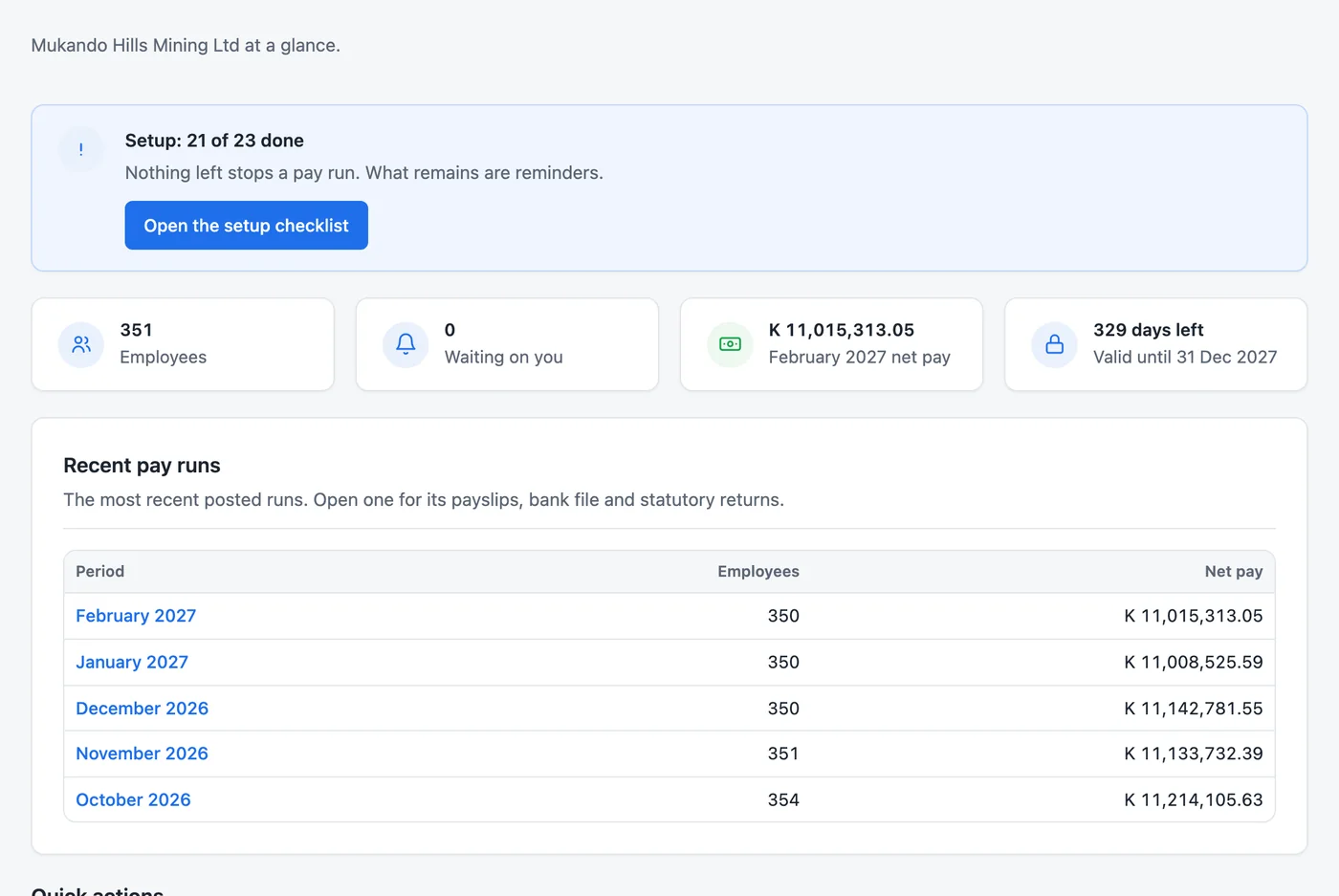
Most payroll software makes you choose between the power to write your own rules and the safety of a system that checks itself. Albo gives you both.
Allowances, deductions, overtime, loan interest and terminal benefits are formulas you can read. A collective agreement fits as it is written, without a developer.
PAYE bands, NAPSA, NHIMA, the skills levy and WCF arrive in signed rate packs, dated from the day the law changes. Nobody in the office can alter a rate.
A posted run is never edited. A mistake is put right with a reversal or an adjustment run, so last year's payslips still say what was paid.
The person who prepares a run cannot approve it. With Professional, pay runs, loans and leave each follow their own chain of up to six steps.
The run works through staff in chunks of 1,000, written to the database in one go, so a mine's payroll runs the same way as a small office's.
Your payroll never leaves your building. If a licence year lapses, Albo keeps paying people. Wages are never held back.
Formulas, the month's run, approvals, rate packs and loans, start to finish.
No sound. The figures are worked examples and the staff are made up.
Your rules, as formulas
Every allowance and deduction carries a formula over basic pay, days worked, hours, shifts and the figures in each grade. A collective agreement fits the system, instead of the other way round.
basic, units, daysWorked, workingDaysPerYearIF, MIN, MAX and ROUND for caps, tiers and conditionsPay components Examples
basic * 0.12basic * units * 1.5 / workingHoursPerMonth380 * unitsbasic * 12 * units / workingDaysPerYearMIN(basic * 0.05, 2500)basic * 0.15Six steps from the first overtime sheet to the last return. Albo checks each one before the next can start.
Step 1
Overtime hours, shifts, new starters, leavers and one-off payments go in, by hand or from a spreadsheet. Albo checks every row before it accepts the file.
Rated units, February Imported
| Employee | Component | Units |
|---|---|---|
| Abel Mwamba | Normal overtime | 12.00 |
| Bupe Mubanga | Sunday overtime | 8.00 |
| Twaambo Malambo | Fuel allowance | 28.10 |
| Yande Ngulube | Normal overtime | 6.50 |
Step 2
Each person's formulas run, then PAYE on the year to date, NAPSA, NHIMA and the skills levy from the rate pack in force, then loan instalments and other deductions.
Computing February Running
Step 3
Before anyone approves, the run lists what is unusual: someone on hold, a loan instalment held back to protect take-home pay, and how this month compares with the last.
February, before approval
Step 4
The person who prepared the run cannot approve it. Each step is taken by someone holding that step's role, and Albo tells them when it is their turn.
Approval steps
Step 5
Posting closes the run for good. From then on it is a record: it is never edited, and a correction is a reversal or an adjustment run that sits beside it.
February 2027 is posted
19 Nov 2026, 21:57, by Lweendo Hachinda
Step 6
A bank file for each employer account, payslips to print, or to email with Professional, the month's returns for ZRA, NAPSA and NHIMA, and the journal for your ledger, all from the posted run.
Ready for February
See it working
Real screens from Albo, with a sample company's made-up staff.
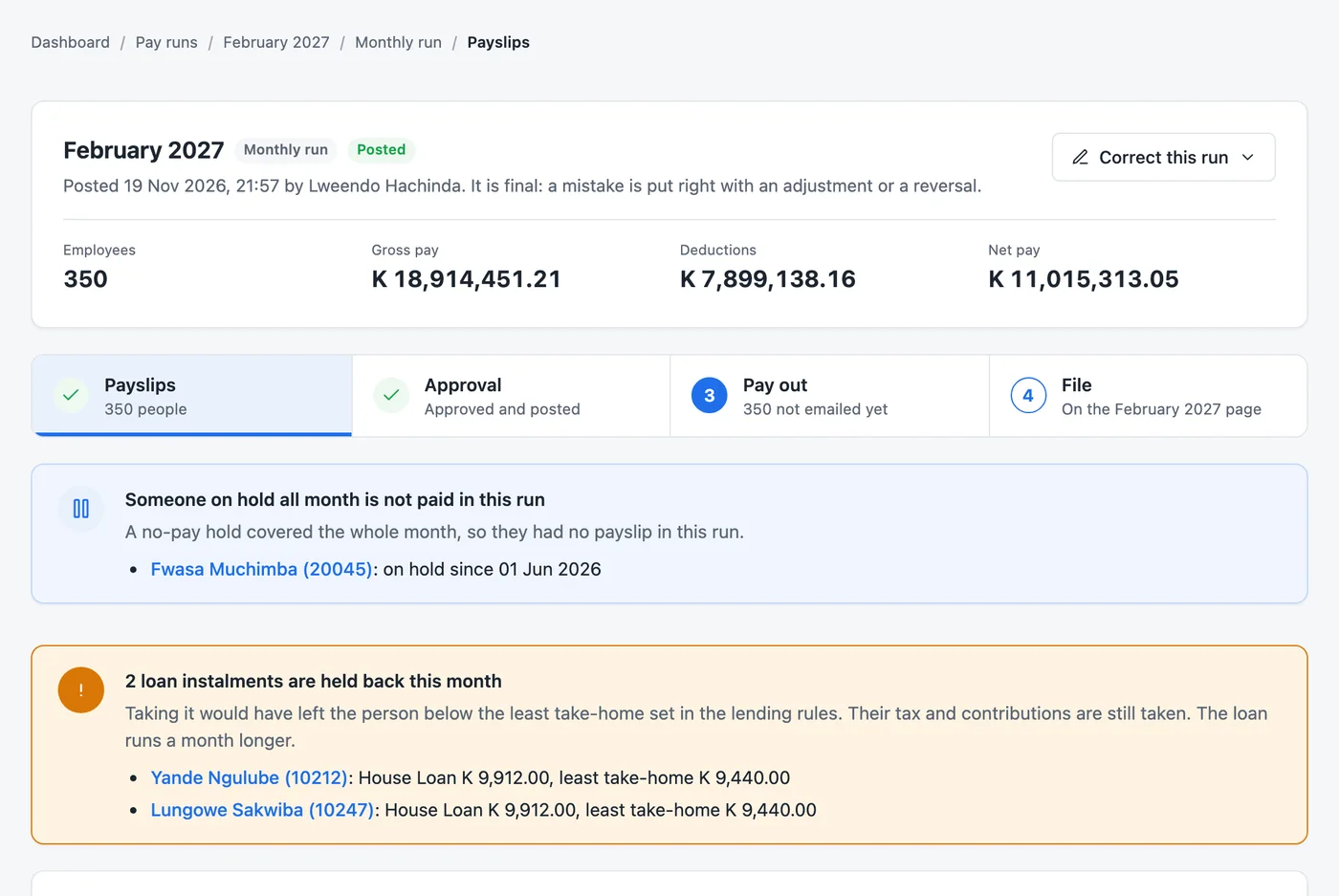
A run is a draft until someone other than the person who prepared it approves it. Albo flags what needs a look first: a person on hold, a loan instalment that would leave someone below their least take-home. Once posted, a run is never edited. A mistake is put right with a reversal or an adjustment run.
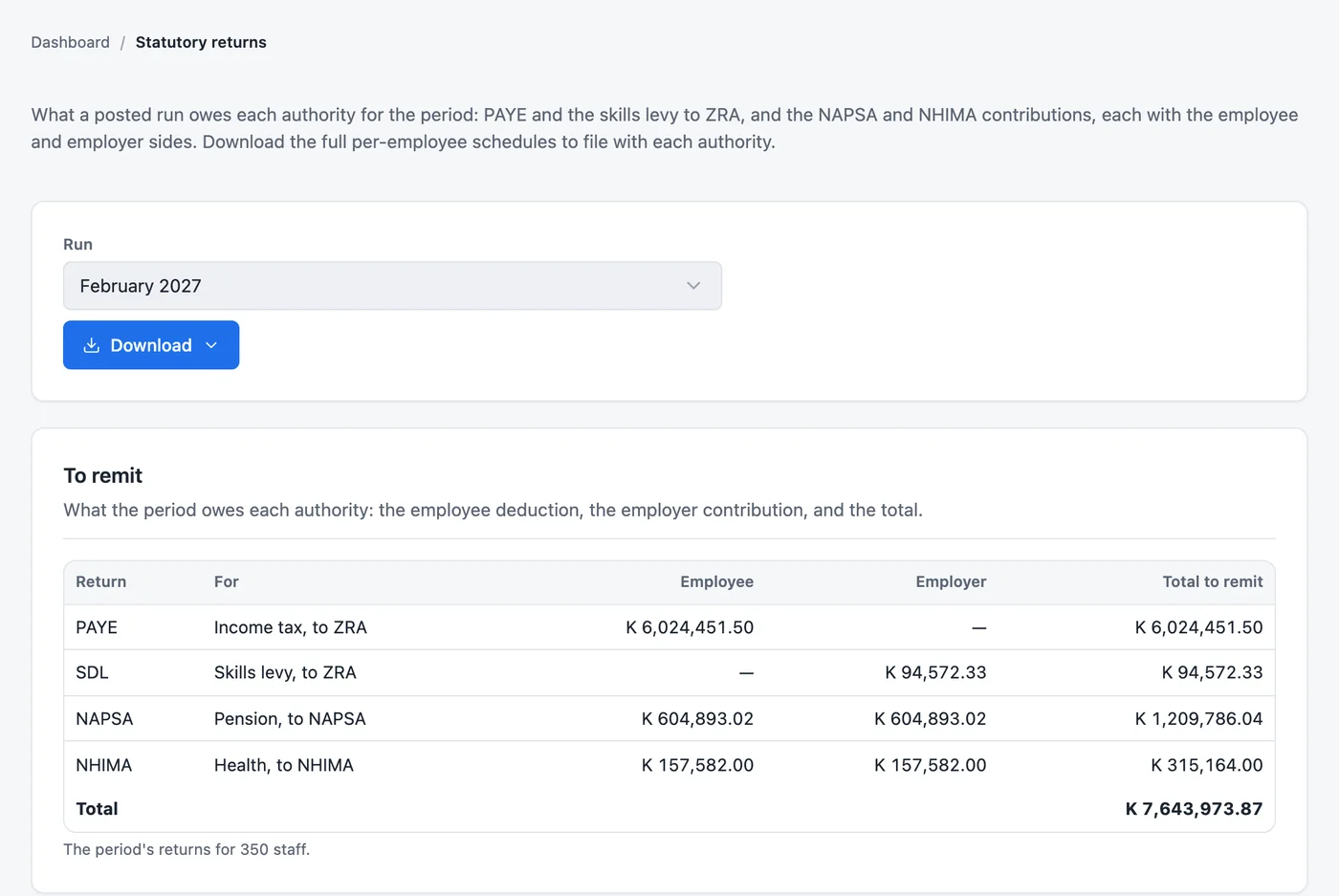
What the month owes ZRA, NAPSA and NHIMA, with the employee and employer sides, and the full schedules to download for each authority. The WCF annual return comes from the same posted runs.
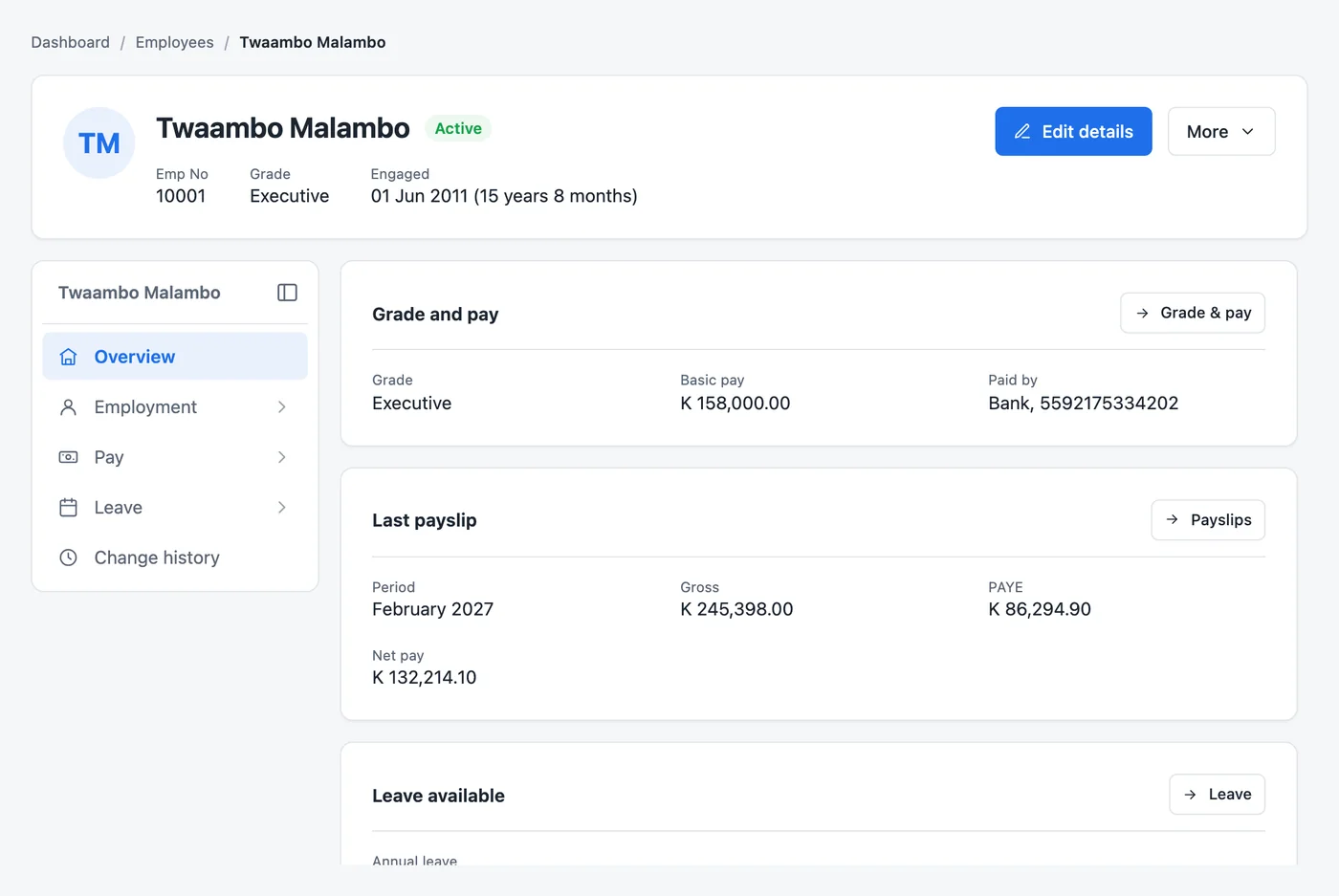
Grade and pay, bank details, leave, loans and every payslip. Bring your staff in from a spreadsheet with their year-to-date pay and tax, and start in any month of the year.
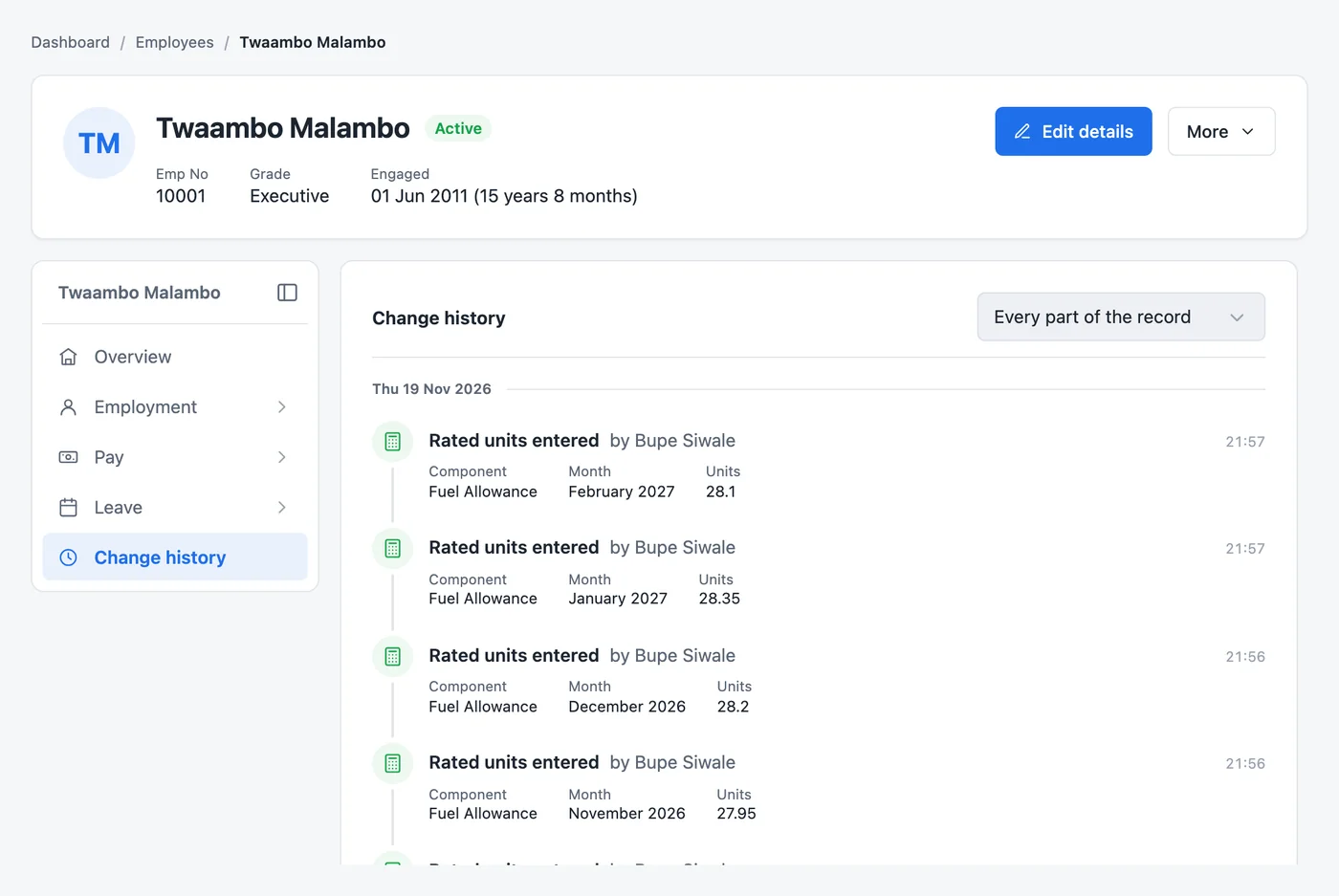
Every change to a person's record is kept: what it was, what it became, who made it and when. Nothing is quietly overwritten, and the history cannot be deleted.
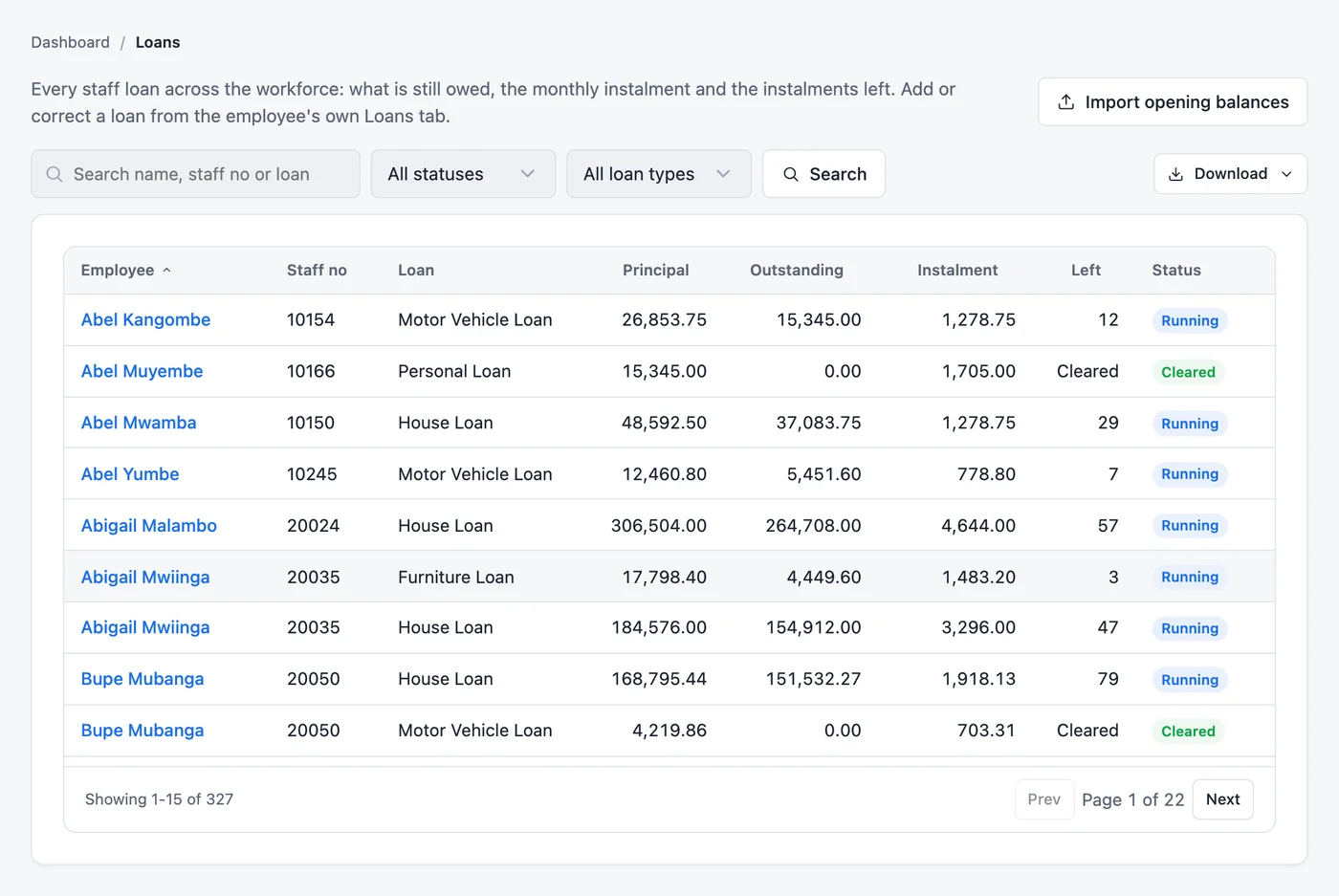
House, car, personal and education loans, and salary advances, each with its schedule, recovered on the payslip. Lending rules stop an instalment from leaving anyone below the take-home you set.
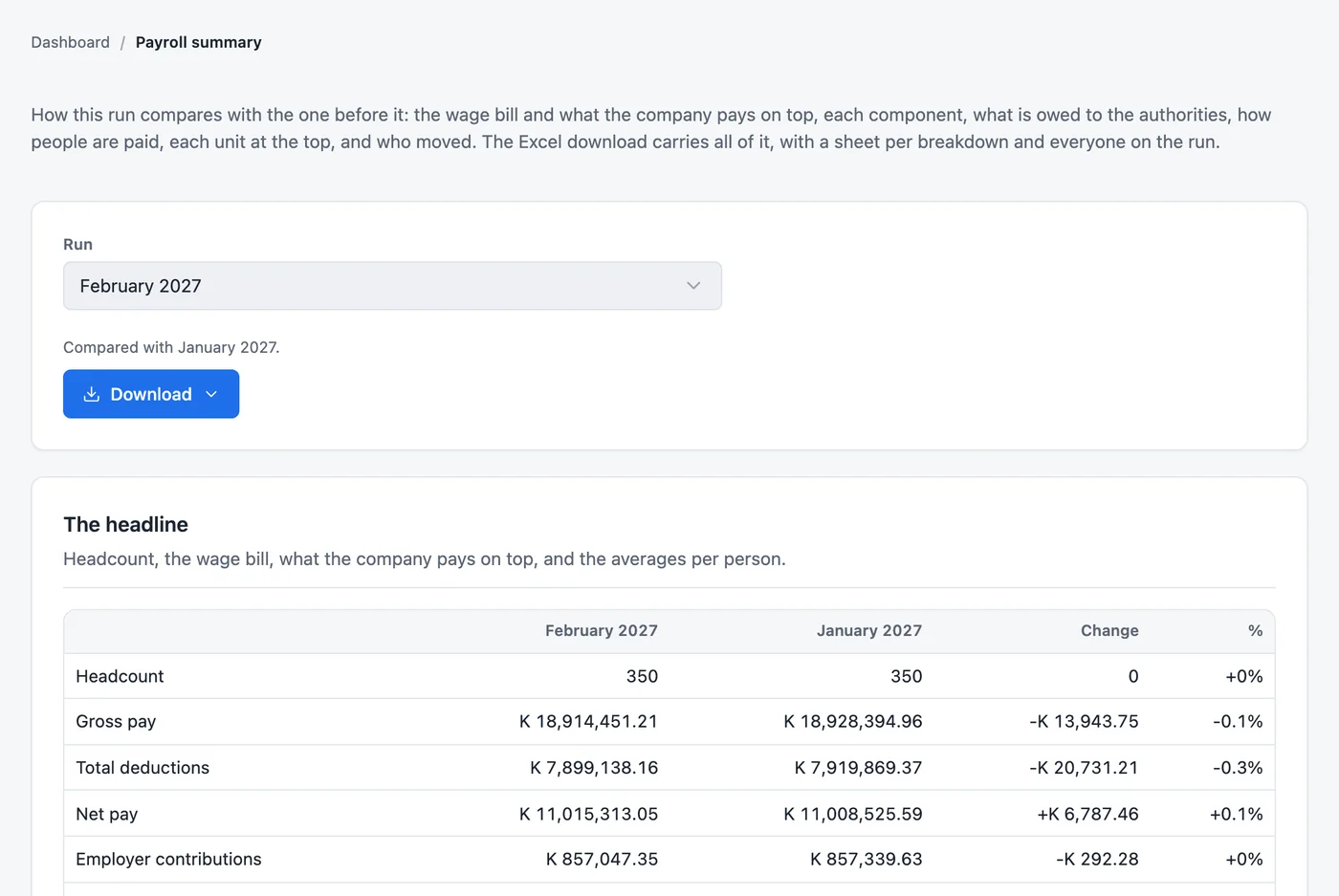
Headcount, the wage bill, what the company pays on top and the averages per person, set against the month before, with every component and who joined or left. One download carries it all.
Staff loans and salary advances
Lend to staff on your own terms, recover it on the payslip, and never leave anyone with too little to live on.
Loans and advances come with Professional.
Personal loan
K 12,000.00 over 6 months, flat 12% a year
12,000 × 12% × ½ year = 720 interest. 12,720 ÷ 6 = K 2,120.00 a month.
| Month | Instalment | Still owed |
|---|---|---|
| January | 2,120.00 | 10,600.00 |
| February | 2,120.00 | 8,480.00 |
| March | 2,120.00 | 6,360.00 |
| April | 2,120.00 | 4,240.00 |
| May | 2,120.00 | 2,120.00 |
| June | 2,120.00 | 0.00 |
When pay is short
Least take-home is 40% of basic. On K 9,000 basic, that is K 3,600.
This month's take-home before the loan is K 5,200. Taking K 2,120 would leave K 3,080, so the instalment is held back and the loan runs a month longer. PAYE, NAPSA and NHIMA are still taken.
Approvals
Set the steps once, each taken by a role you choose. Albo sends the work to whoever holds the next step, and nothing moves until they act.
A second person approves every run in both editions. Chains of several steps come with Professional.
PAYE bands, NAPSA, NHIMA, the skills levy and the WCF rates come to you in a rate pack from eLucive. It is signed, so it cannot be altered on the way, and nobody in your office can change a rate by hand.
A budget or a statutory instrument sets a new band or rate, and the day it starts.
The new figures, checked against the Act or the notice, dated from that day.
A pack that has been touched is refused. Every install is kept on record.
Months before the change keep the old rates, so a back-pay run is still right.
Rate pack, Zambia
Issued by eLucive Software Solutions
Who installed it, and when, is kept on record. Earlier months keep the rates they were paid on.
Switching to Albo
Moving payroll is the part people dread. With Albo it is your own spreadsheets, checked row by row, one month run side by side, and a go-live. Nobody's tax starts again from zero.
Every file checked in full before a row was saved
Upload a file or paste rows straight from Excel. People and grades are matched by the staff numbers and grade codes you already use.
You see what a file will do first. One wrong row stops the file and names its line, so nothing is ever half loaded.
Year-to-date pay and PAYE come across, so cumulative PAYE carries on from the right figure in whichever month you switch.
5,000 staffloaded in under a second, with every one of them on the record.
Pick a moment every payroll office knows.
The budget changes the tax bands
An old system
Albo
Nobody types a rate
A run went out wrong
An old system
Albo
Every kwacha paid stays on the record
The auditor asks who changed a salary
An old system
Albo
The answer is on the screen
Someone leaves in the middle of the month
An old system
Albo
Paid right on the way out
The payroll is ready to pay
An old system
Albo
Four eyes on every run
The returns are due
An old system
Albo
Filed from the same figures you paid
Albo is installed on your own server. Not a website you rent, and not someone else's cloud.
On a Linux or Windows server in your building or your data centre. Albo sends none of your employees' data to eLucive or anyone else, and it does not need the internet to run a payroll.
Your team uses Albo from a web browser on the company network, and each person sees only what their role allows. With Professional, they sign in with your Active Directory.
If a licence year is not renewed, Albo keeps running. You can still pay people and read your records. Only new rate packs, updates and support stop.
Everyone you employ
Permanent staff, fixed-term contracts, casuals paid by the day and shift workers paid by the unit. Each is paid the way their terms say, and all of them in the same run.
One run, one approval, one bank file
The same screens, the same rules and the same price per person at every size.
Payrolls like these
Getting started
We set Albo up with you, a step at a time. Your old payroll keeps running until Albo has matched it payslip for payslip, so nobody's pay is ever the experiment.
Bring these to the first meeting
Step 1
Step 2
Step 3
Step 4
Step 5
Your people are paid from Albo, and the returns are filed from the same figures.
Editions and pricing
Both pay people lawfully, end to end, with every statutory return. Professional adds what larger and more complex payrolls need.
Standard
Everything it takes to pay people right
For payrolls paid mostly by the month, with one person to approve each run.
Professional
Everything in Standard, plus
For larger payrolls with shifts, staff loans and approvals across departments.
Counted each year at renewal. Everyone in your office who uses Albo is included.
No price bands, so one more hire never makes the price jump.
Signed rate packs, updates and support are part of it.
Several companies in a group take a discount on each install, never a surcharge.
If a year is not renewed, Albo keeps paying your people. Only new rate packs, updates and support stop.
Setting up and bringing in your data is quoted with the licence, by the size of your payroll. Ask us for a quote
| Feature | Standard | Professional |
|---|---|---|
| Paying people | ||
| Employees, grades and positions | Included | Included |
| Pay components written as formulas | Included | Included |
| Monthly staff and casuals paid by the day | Included | Included |
| Hours, shifts and piece work paid by the unit | Not included | Included |
| Loans and advances, with lending rules | Not included | Included |
| The pay run | ||
| Run, review, approve by a second person, post | Included | Included |
| Reversals, adjustment runs and leavers' settlements | Included | Included |
| Approval chains of up to six steps | Not included | Included |
| Paying and filing | ||
| Payslips and bank payment files | Included | Included |
| PAYE, NAPSA, NHIMA, skills levy and WCF returns | Included | Included |
| The payroll journal for your ledger | Included | Included |
| Payslips emailed to each person | Not included | Included |
| People and control | ||
| Leave, leavers and terminal benefits | Included | Included |
| Roles, permissions and change history | Included | Included |
| Sign-in with Active Directory or LDAP | Not included | Included |
| Reports | ||
| Payroll and statutory reports | Included | Included |
| Cost by unit, coinage and loans reports | Not included | Included |
| Group reporting across your companies | Not included | Included |
| Every year | ||
| Signed rate packs, updates and support | Included | Included |
Something else?
Ask us about your own payroll. A person at eLucive answers.
eLucive builds a rate pack with the new bands, signs it so it cannot be altered, and dates it from the day the law takes effect. You install it, Albo checks the signature, and the next run uses it. Months before the change keep the old rates. Nobody types a tax band.
Yes. We import your employees and their year-to-date pay and tax, so PAYE carries on correctly from the month you switch. We recommend running Albo beside your current payroll for a month and comparing every payslip before you go live.
On your own server, in your building or your data centre. Albo does not send your employees' data to eLucive or anywhere else, and it does not need the internet to run a payroll.
A server or virtual machine with Linux or Windows Server, Java 21 and MySQL 8.4. Your staff use Albo from a web browser; nothing is installed on their computers. We size the machine with your IT team before the install.
Cumulatively, on the year to date, from the bands in the rate pack in force. A back-pay or adjustment run is re-taxed through the year to date, so the tax comes out right without a special rule for arrears.
Yes, with the Professional edition. Each loan type has its own interest method, from interest-free to reducing balance or your own formula, limits by grade, and your lending rules. Instalments come off the payslip, and an instalment that would leave someone below the least take-home is held back for a month.
Yes. In both editions a second person approves every run. With Professional, pay runs, loans and leave requests each follow their own chain of up to six steps, each taken by a role you choose. Whoever prepared it can never approve it.
Yes. Leave types with their own accrual, requests and approvals, balances, the leave year-end, and leave sold back paid on the payslip.
Yes. Hours, shifts, days and piece work are entered as units each month and paid at a rate that follows each person's pay. This comes with the Professional edition.
Each company has its own install, so each payroll stays its own. With Professional, head office brings every company's monthly figures together and sees the group's payroll as one.
Albo keeps running. You can still pay people and read your records. What stops is new rate packs, updates and support, so the tax rates go out of date. Wages are never held back.
eLucive, the team that builds it, from Lusaka. Rate packs, updates and support come with the licence; implementation and training are part of getting you live.
By the number of employees in service, at the same rate whatever your size, with a yearly minimum. A group with several companies pays less per install.
No. It suits a company of 50 staff, and the pay run is built for 50,000.
Tell us how many people you pay, how they are paid, and what you use today. We will show you Albo working on rules like yours, at your office or online.